
• Skip to primary navigation
  • Skip to main content
  • Skip to footer

Holiday ordering and shipping dates

Digital Silver Imaging Logo

Digitalsilverimaging

The Fine Art of Printing in a Digital World

  • Order Now
    • Direct-to-Print
    • Value Prints
    • Custom Print Upload
  • Prints
    • DSI Digital Silver Prints®
    • Inkjet/GiclĂ©e Prints
    • Direct-to-Print Service
    • Value Prints
    • Try Us - Print Sample Promotion
    • Aluma Mounts
  • Digitize
    • Scanning & Retouching Services
    • Art Reproduction & Giclee Printing
  • Frame & Finish
    • Print Mounting
    • Print Matting
    • Value Frames
    • Custom Wood Frames
    • Welded Aluminum Frames
    • Print Hangers
  • More
    • Consulting and Curation
    • About DSI
    • The DSI Team
    • DSI Blog
    • Frequently Asked Questions
    • DSI Swag
    • The Unbound Portfolio®
    • Close Out
  • Contact
  • Search
  •  

Printing

What is Baryta photo paper?

December 3, 2025 by

Photographic or inkjet paper with coating containing barium sulfate are referred to as Baryta papers. Baryta, barium sulfate, creates brilliant white base, enhanced contrast, and classic photographic paper appearance. Baryta papers can be both traditional silver gelatin papers, DSI Digital Silver Print®, and modern inkjet papers like Hahnemühle Photo Rag Baryta.
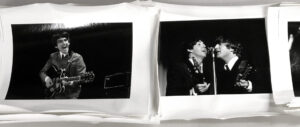
stack of photos of the Beatles taken by Michael Mitchell
DSI Digital Silver Prints® of the Beatles taken by Michael Mitchell. Prints will be flattened, trimmed and delivered to the photographer. These prints have a baryta base.

Aspect Ratio & Print Size

October 24, 2025 by

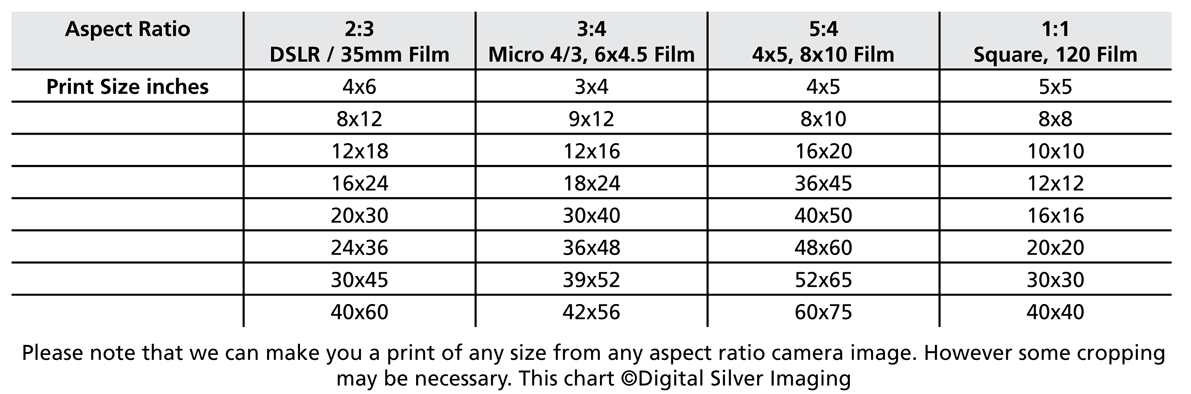
Aspect ration versus print size is an important issue to understand when printing your photographs. When digital cameras appeared on the scene they were designed to mimic the look and operation of analog cameras. Even today’s digital cameras have sensor sizes based on traditional analog film formats.

Why does aspect ratio matter when printing?

It matters because aspect ratio, the proportion of your camera’s sensor length vs. width, determines how your image fits on a piece of printing paper. If you choose a print size that does not match the aspect ratio of your camera image, then you will need to crop your image to fit on the print. Use the chart below to give you an Idea of the print size that matches your camera’s sensor or film size.


How do I export files for print in Lightroom?

May 16, 2018 by

Exporting files from Adobe Lightroom for printing is not always an intuitive process. We have put together this tutorial to show our customers how to export files to create the best prints possible using our services. You can read our post on the full procedure here

What is the Archival Life of my print?

November 2, 2017 by

In this FAQ you will find a quick overview of the archival life of our products. For an in depth report on how Digital Silver Imaging’s prints compare to other print options follow this link.

DSI Digital Silver Fiber Prints®  are made on black & white, light sensitive, silver gelatin, Ilford Gallerie paper. This is a heavy weight, baryta paper with a proven history of archival quality, light fastness, and durability. Henry Wilhelm, of Wilhelm Imaging Research called our prints “the gold standard” in black and white print longevity.

DSI Digital Silver RC Prints® are made on black & white, light sensitive, silver gelatin, Ilford Resin Coated paper.RC paper is sealed between layers of polythene with the emulsion and a ‘super-coating’ on top. This makes them a typically more robust paper that is easier to handle. This is a medium weight paper comes on a bright white resin coated base. It has excellent lightfastness, it can be rolled, and is ideal for commercial applications.

DSI Museum Quality Inkjet Prints are made on Canon Prograf printers using the latest Lucia Pro pigment inks. Not all inks are created equal, and Canon Lucia pro inks meet the highest archival standards. When printing on a quality paper with no OBAs (optical brightening agents), like HahnemĂĽhle Photo Rag, these prints will last over 200* years framed under UV glass, and 300* years in dark storage. Digital C prints can’t compare, making our prints the best choice for quality and price.

Standard Inkjet Prints are made on Canon Prograf printers using the latest Lucia Pro pigment inks. Not all inks are created equal, and Canon Lucia pro inks meet the highest archival standards. These prints differ from our DSI Museum Quality Prints in that they are made on quality papers that may not meet the highest standards set by preservationists.

*Based on Wilhelm Imaging Research’s paper  “Canon image PROGRAF iPF6100 and Canon LUCIA Pigment Inks“, 6/15/09

How do I prepare my file for printing?

November 1, 2017 by

Start with a calibrated monitor! Calibrating your computer monitor is essential because it gives you a much more accurate rendition of how your file will print. Calibration insures that both you and Digital Silver Imaging are looking at an image that will appear the same on your monitor and ours in the lab.

File Format  We prefer .TIFF but a .JPEG saved at actual print size and 300 ppi is also acceptable. We can print from almost any file type including RAW or .PSD. However, unless you have a specific reason for using a RAW or .PSD this file type slows down file transfers and increases printing times. There is no quality gain from using a RAW file instead of a .TIFF.  Our online Direct-to-Print  currently only accepts .JPEG files. You can send .TIFF, .PSD and .JPEGs to our Custom Print Service.

File Size The sweet spot for our DSI Digital Silver Prints® and Museum quality inkjet prints is 300 ppi/dpi at 100% size. In other words, if you want an 11×14″ print the file should be 11×14″, 300 dpi/ppi at 100%.

How do I export files from Adobe Lightroom? We have a short tutorial on how to export your files for print from Lightroom. Follow this link to view the tutorial.

DSI Shipping Policies

May 22, 2017 by

All orders within the US ship via UPS Ground or United States Postal Service (USPS). We happily ship orders all over the globe. International shipping quoted on a per order basis. Shipping charges are determined by package size/weight. All prints, up to 20″ x 30″, are shipped flat, unless otherwise requested.

Estimated Shipping Charges – Although we try to be as accurate as possible, shipping estimates are subject to change. Because every order is different, and we package orders to best protect your images, it is often impossible to predict exactly what the final charge will be. Simply put an estimate is not exact and may vary.

Using Your Own Shipping Account – If you have an account with FedEx, UPS or a freight carrier we are happy to ship using your personal/commercial shipping account. Please note that we will add a handling fee to cover our costs of packaging and order entry.

Custom Shipping Crates and Overseas Shipping – Yes we can do all that. Every project and shipping destination is different so please let us know when placing your order and we will create an estimate for you.

Damaged Shipments – We have developed packing methods to best protect your prints in transit. However at times damage does occur. It is important that you follow these steps so that a damage claim can be filed. Failure to do so may result in the loss of a refund on your order. If  the carrier is present, always review and note exterior damage with the delivery person.

1. Photograph the EXTERIOR of your package. Making several photographs from different angles is important.
2. Keep ALL packaging
3. Call Digital Silver Imaging (617) 489-0035 immediately and email your photos to us at info@digitalsilverimaging.com

Digital Silver Imaging’s liability is limited to the replacement of the product that we have produced. We are not responsible for loss incurred as the result of an order that was damaged in shipping. If the customer request that we use their shipping account to make a shipment, the customer must file all damage/loss claims against the shipper. Digital Silver Imaging will not replace prints, frames, mats or any other product damaged or lost when using the customer’s shipper.


Footer

Digital Silver Imaging

9 Brighton Street
Belmont, MA 02478
617-489-0035
email us
map and directions
shipping info
Hours: 9–5:30 Monday–Friday

Sign Up for DSI-eNews

We'll send you a discount code you can use in your first order and occasional emails to inform you of new services, promotions and events.

  • This field is for validation purposes and should be left unchanged.

Follow DSI

  • Facebook
  • Instagram
  • RSS
  • YouTube

All content © 2025 Digital Silver Imaging · Privacy Policy · powered by WordPress · web design by smallfish-design