• Skip to primary navigation
  • Skip to main content
  • Skip to primary sidebar
  • Skip to footer
Digital Silver Imaging Logo

Digitalsilverimaging

The Fine Art of Printing in a Digital World

  • Order Now
    • Direct-to-Print
    • Value Prints
    • Custom Print Upload
  • Prints
    • DSI Digital Silver Prints®
    • Inkjet/Giclée Prints
    • Direct-to-Print Service
    • Value Prints
    • Try Us - Print Sample Promotion
    • Aluma Mounts
  • Digitize
    • Scanning & Retouching Services
    • Art Reproduction & Giclee Printing
  • Frame & Finish
    • Print Mounting
    • Print Matting
    • Framing
    • Print Hangers
  • More
    • Consulting and Curation
    • About DSI
    • The DSI Team
    • DSI Blog
    • Frequently Asked Questions
    • DSI Swag
    • The Unbound Portfolio®
    • Close Out
  • Contact
  • Search

DSI Blog

Essential Photoshop Tools for Photographers Workshop 1/26

January 11, 2013 by Digital Silver Imaging

Photoshop remains the most powerful digital imaging software available. Knowing how to best use Photoshop in your post production workflow is essential, even when using other applications such as Lightroom and Nik plug-ins. This workshop will get to the heart of Photoshop for photographers.

What will be covered:
• Using Adobe Camera Raw for non-destructive image editing
• The Power And Ease Of Using Smart Objects
• Utilizing Layers and Layer Masking
• Retouching tips and tricks, which tool works best for your needs
• The magic of Content Aware Fill/Scale/Move
• How To Efficiently Collage Images
• Creating Panoramas
• Photorealistic HDR
• Plug-ins
• “Best Practices” considerations

Requirements: You should be using Photoshop CS4, CS5 or CS6.

This will be a 3 hour workshop with two 10 minute breaks and time for question and answer.

After Workshop Benefits: Post-Workshop Website; Blog; Follow-up On-Line meeting
For one week following the workshop, Bob will moderate a “Workshop Blog” where students can post and discuss class questions.  Follow-up 1- hour On-Line meeting (with open-mic  & PC sharing)for class members. (a $29 value). A ”Workshop Website”  with notes and resource links. Plus all participants will receive a $25 OFF coupon on the purchase of any Digital Silver Imaging printing, framing, matting, or mounting purchase of $50 or more.

When: Saturday, January 26, 9:30am – 1pm

Location: Digital Silver Imaging, 11 Brighton Avenue, Belmont, MA
Cost: $99.00, Bring a friend $89.00 each at time of payment.

Essentials

Bob DiNatale’s Bio:
Photographer and teacher, Bob conducts workshops, lectures and private instruction in all areas of digital photography… specializing in 1-on-1 Online Training. He began serious photography in 1965 and has explored conventional darkroom techniques in both B&W and color. Bob presented his first digital media production in 1984, founded the Olympus School of Digital Photography in 1998, is Adobe Certified in Photoshop Lightroom  and continues to work at the leading edge of digital technology. A Nikon School instructor, along with his work at Polaroid R&D in silver emulsions and a US patent in color printing, give Bob a broad base in film photography. As digital photography continues advance, Bob blends his experience in both film & digital photography to offer a unique perspective and understanding in digital imaging.

Help spread the word!

Filed Under: Events, News, Workshops

Holiday Schedule – 2012

December 14, 2012 by Digital Silver Imaging

The lab will be closed 12/24/12-1/2/13, any new orders will be shipped in the new year. You may still upload orders but no production will take place during our holiday vacation. – Have a Peaceful Holiday and a Happy New Year

Help spread the word!

Filed Under: Events, News

20×30 Poster Print for $25! Color or B&W

November 30, 2012 by Digital Silver Imaging

©Carl Stoveland

Welcome to Digital Silver Imaging! We give you two quality options for our $25 poster print special. The first is a Real Black & White silver gelatin  print made on light sensitive Ilford RC paper. We take your digital file and project it onto the photo paper then process it in liquid photo chemistry. For Color prints we make museum quality archival inkjet prints on Epson printers with genuine Epson HDR inks. The gold standard in color printing. If you’ve used our ROES direct-to-print service follow this link to upload your order(the ROES application works for B&W or Color orders) If you are new to Digital Silver Imaging and ROES just keep reading. Use Promo Code FBDEC12.

How to use our ROES Online Service
Our ROES app is very intuitive. We have outlined the process step-by-step below.

Step1

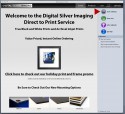
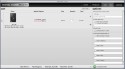
Step 1. Follow this link and download the free ROES Java script application. This app automates the ordering process so you get exactly what you want.

Step 2

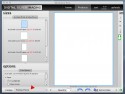
Step 2. Once you have downloaded and started the ROES app, click the “start ordering” button


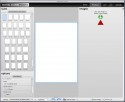
Step 3. Click the green “add images” button to import your images into ROES. You need to have your image(s) in a folder. Note: For best results images need to be between 260-300 ppi at actual size. JPEG format. We also recommend RGB color space for both black & white and color printing.

Step 3

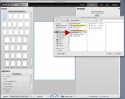
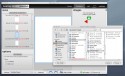
Step 4. Select your image folder from your computer

Step 4

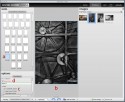
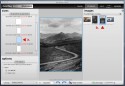
Step 5. When your images are in ROES, click on the size of the print you want (a), Drag the image you want to print into the image area (b), and click on the type of print (c), and enter your promo code if you have one (d).

Step 5

Once you are satisfied click “add to cart” ant the bottom of the screen. You can continue to process more images in the same way or proceed to “view cart” and check out.

Step 6

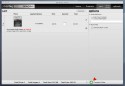
Step 6. In the “cart” window review your order. If you are making multiple prints they will all appear in this window. You can delete individual prints or all orders and start again if you want to make changes. You also have other options such as rush shipping, and alternative ship-to address if needed. Click “complete order” when you are satisfied.

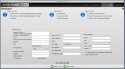
Step 7. In this window you will enter all your personal and payment information. Finish by clicking the green “place order” button to complete. You will receive email confirmation of your order. Done!

Step 7

Ready to order? Click Here

Offer expires 12/31/12


Help spread the word!

Filed Under: Promotion, Uncategorized

1956 – Don Larsen’s Perfect Post Season Game

November 19, 2012 by Digital Silver Imaging

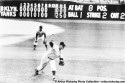
1956-Don Larsen: Perfect Game © Arthur Rickerby Photo Collection

Brooklyn Dodgers vs New York Yankees

Brooklyn Dodgers vs New York Yankees
October 8, 1956 Box Score

This was the first and only post season perfect game in baseball.  Photographer Arthur Rickerby captured the Dan Larsen’s final pitch of the game and the Yankees went on to win 2-0 in 1956. This was the first and only postseason (including League Championship or World Series) no-hitter / perfect game in Major League history.

Thank you to our client, David Rickerby, for sharing this historic photo from his father’s collection.

Help spread the word!

Filed Under: Uncategorized

Digital Silver Imaging Holiday Specials

November 15, 2012 by Digital Silver Imaging

Print, Mat & Frame Special with ROES 

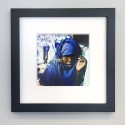
10x10 DSI Wood Value Frame

What better gift than the gift of photography. With this special you can have your image made as a real b&w silver gelatin RC print or beautiful museum quality color inkjet print, matted and framed for a truly low price. Images are mounted to museum quality board and matted with a 4 ply bevel cut mat. Your matted image is then placed in our handsome black wood DSI value frame with UV acrylic glazing. Simply stunning.  See the bottom of this page for directions on using ROES, or go to this link and select “Holiday Promo” from the ROES catalog menu.

Note: Please order early to guarantee that your order arrives for the Holidays. Most orders will be completed in 4 to 6 business days. Shipping not included.

8×10 image in an 11×14 mat and frame reg. 75.95  sale 56.95
8×8 image in a 12×12 mat and frame reg. 87.95 sale 65.95
8×12 image in a 12×16 mat and frame reg. 97.95  sale 73.95
11×14 image in a 16×20 mat and frame reg. 104.95  sale 83.95
13×19 image in a 18×24 mat and frame reg. 139.95 sale 99.95

 20% OFF Real Black & White Fiber Prints

Save on black & white fiber prints 11×14 and larger. Use promo code DSI1212, discount taken at checkout. Follow this link.

$35 Rebate Plus Free Shipping on X-RIte ColorMunki Display

The ColorMunki Display is 134.00 after mail in rebate. Follow this link to purchase

$50 Rebate Plus Free Shipping on i1-Display Pro

The i1-Display Pro is 199.00 after mail in rebate. Follow this link to purchase

20%+ OFF Infrared Camera Conversions 

For all the details on IR Conversions follow this link
Digital Point and Shoot Cameras                  Reg. $ 219    Sale $189
Digital 4/3 and Hybrid Cameras                     Reg. 259    Sale 199
Digital Single Lens Reflex, DSLR Cameras   Reg. 259    Sale 199
Digital Full Frame Cameras                            Reg. 349   Sale 279
Prices may vary slightly depending on camera model
All promotions end 12/31/12.

Using our ROES Service

Download Roes App
Step 1

Step 1. Go to our Value Priced Printing page and click on the download of the free ROES Java Script application.


Step 2

Step 2. After downloading and opening the ROES application. Select “Holiday Promo”  from the “Catalog” menu.

Step 3

Step 3. Click on the green “add images” arrow and select images from your computer. The images you select will then populate the “images” portion of the window. Note: placing images in a folder on your computer first works best with this function

Step 4

Step 4. Select the size photo you want to print from the “sizes” menu (a.). Then you can select the image you want to print from the “images”  menu (b.). At this point you will also be able to position the image in the window so you can crop the image to your liking. When finished click the “add to cart ” button. You can then process another image or proceed to step 5 to finalize your order.

Step 5

Step 5. Once you have made all the adjustments click the green “go to cart” button to view your order. If you have made a mistake simply click “clear cart” to start again or select the “x” next to the image to delete a single image from your order. Once you are satisfied, click the green “complete order” arrow and enter your payment and shipping information. If you have any problems please give us a call at 617.489.0035 during business hours and we will be happy to assist you.


Happy Holidays from Digital Silver Imaging

Help spread the word!

Filed Under: News, Promotion

Lightroom 4 – Advanced Workshop 12/8

November 1, 2012 by Digital Silver Imaging

Kathy Tarantola Image
©Kathy Tarantola

Lightroom is the essential software tool for any serious photographer. Now that you’ve learned the basics, it’s time to delve deeper into the program to really enhance your workflow. Experienced instructor Kathy Tarantola will help guide you through the key features.

This workshop will review and then further explore the Library and Develop modules. With hands-on practice, you will better understand how to manage a post-production workflow that includes hundreds of images. In Develop we will work on finessing the tools, as well exploring other feature panels such as Tone Curve, Hue Saturation and Luminance, and the all important noise reduction in the Detail panel.

Library Module
• Import process optimized • Organizing • Renaming • Presets • Keyword Lists • Using ratings and filters • Working with multiple catalogs • Smart Collections • Better searching • Advanced exporting

Develop Module
• Perfecting tone and color in each photo • Hue, Saturation, Luminance and Tone Curves • Target Adjustment Tool • Applying sharpening and noise reduction • Correcting lens distortion and chromatic aberration • Paintbrush/ Tools • Making great black and white conversions • Presets • Soft Proofing for printing

Then we will have an overview of the Map, Book, and Slideshow Module, but really delve into the Print and Web modules.

Map, Book and Slideshow
• Mapping your photos with GPS• Create professional looking books right from inside Lightroom • Output slideshows and export as PDF or video

Print Module
• Printing packages or single images • Customizing the page layout • Create your own custom print packages • Configuring optimal page set-up and print settings

Web Module
• Create professional looking web galleries using Lightroom presets • Create your own user preset gallery • Manage watermarks and other metadata • Uploading the gallery

Prior experience with Lightroom is necessary; either having completed the Lightroom 101 workshop or having a good working knowledge of the basics of the Library and Develop modules. A laptop computer loaded with the current version of Lightroom 4 is required.

Topics emphasized will be based on student needs and skill level. There will be time for working on images and questions.

Time: Saturday, December 8, 2012, 12-6PM
Place: Digital Silver Imaging, 9 Brighton Street, Belmont, MA
The fee for this course is $149, Space is limited.

Advanced Lightroom

WS LR2

BIO: Kathy Tarantola
For over two decades, Kathy Tarantola has been sought after as a commercial and editorial photographer working throughout Boston and New England. Kathy is an experienced instructor having conducted photography workshops across the US and abroad. She is a respected member of the photo community and has served as Co-president and board member of the New England chapter of the American Society of Media Photographers (ASMP).

Help spread the word!

Filed Under: News, Workshops

  • « Go to Previous Page
  • Page 1
  • Interim pages omitted …
  • Page 18
  • Page 19
  • Page 20
  • Page 21
  • Page 22
  • Interim pages omitted …
  • Page 46
  • Go to Next Page »

Primary Sidebar

Categories

  • Case Studies (9)
  • Customer Profile (14)
  • DSI Product Information (11)
  • DSI-News (14)
  • Events (29)
  • General News (37)
  • General News>Friends of Digital Silver Imaging (4)
  • Interview (3)
  • News (57)
  • Promotion (13)
  • Reviews (3)
  • The Griffin Museum at Digital Silver Imaging (6)
  • Uncategorized (167)
  • Workshops (35)
  • z15 (1)

Digital Silver Imaging

9 Brighton Street
Belmont, MA 02478
617-489-0035
email us
map and directions
shipping info
Hours: 9–5:30 Monday–Friday

  • Facebook
  • Instagram
  • RSS
  • Twitter
  • YouTube

Footer

Digital Silver Imaging

9 Brighton Street
Belmont, MA 02478
617-489-0035
email us
map and directions
shipping info
Hours: 9–5:30 Monday–Friday

Sign Up for DSI-eNews

We'll send you a discount code you can use in your first order and occasional emails to inform you of new services, promotions and events.

  • This field is for validation purposes and should be left unchanged.

Follow DSI

  • Facebook
  • Instagram
  • RSS
  • YouTube

All content © 2026 Digital Silver Imaging · Privacy Policy · powered by WordPress · web design by smallfish-design